seo-audit — 基本SEO監査
シンプルなSEOエージェントスキルで、迅速かつデフォルトの単一ページSEO監査向けに設計されています。OpenClawによって駆動。初回のページチェックや、完全な技術的詳細を必要としない迅速な評価に適しています。
このスキルを使用するタイミング
以下の場合にseo-auditを使用します。
- ユーザーが言った場合: "audit this page", "check SEO", "analyze my URL", "quick SEO check", "what's wrong with my page"
- 特定の深さが要求されていない — これがデフォルトのエントリーポイントです
- ユーザーが包括的な技術的ブレイクダウンではなく、速く読めるサマリーを必要としている場合
より深い分析が必要な場合は、seo-audit-fullにアップグレードしてください:
ヒント: 深いテクニカル監査、高度なオンページSEO、または完全なレポートには、
seo-audit-fullスキルを使用してください。
期待される入力
| 入力 | 必須 | 注意 |
|---|---|---|
| ページURL | はい | The page to audit |
| 生のHTMLまたはページコンテンツ | オプション | Enables more accurate on-page analysis |
| GSC / アナリティクスデータ | オプション | Not required for basic audit |
URLのみが提供され、ソースコードやクローラーデータが利用できない場合は、明確に述べてください:
制限: This audit is based on visible page content and publicly available signals only. Source code, GSC data, crawl logs, and performance metrics are not available for this audit.
出力
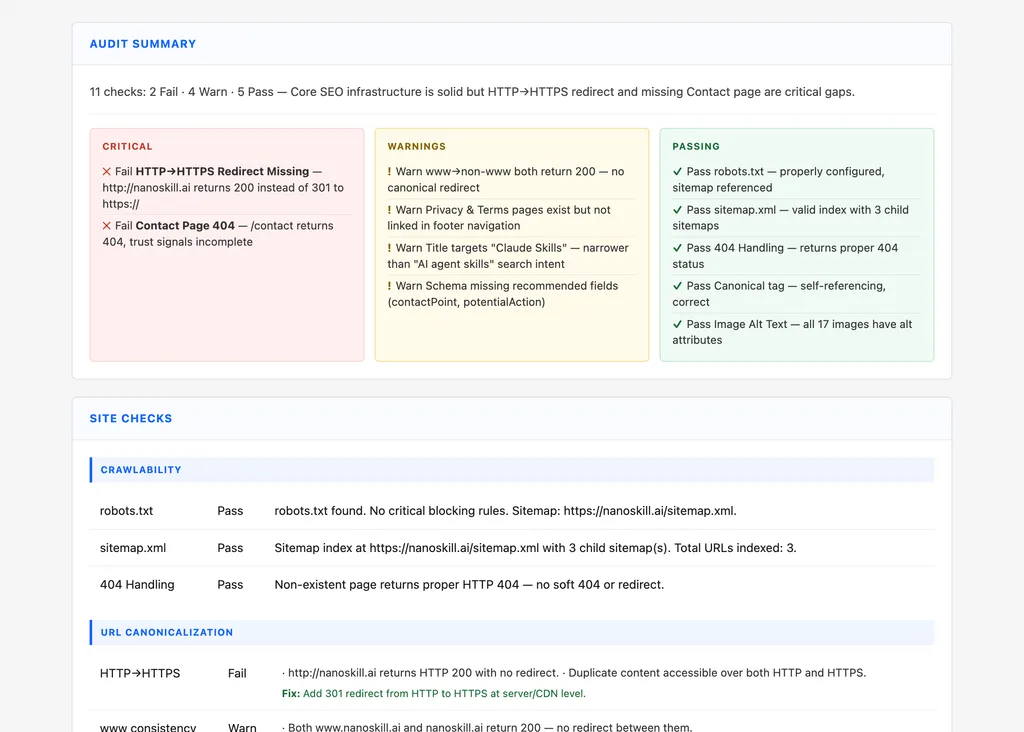
テンプレートassets/report-template.htmlに記入して基本SEO監査レポートを作成し、 ファイルに保存してください — 端末に生のHTMLを表示しないでください。
ファイル命名: reports/<hostname>-<slug>-audit.html
https://example.com/blog/best-tools → reports/example-com-blog-best-tools-audit.html
https://example.com/                → reports/example-com-audit.html
保存後、ユーザーに伝える:
✅ Report saved → reports/example-com-audit.html
   Open it now? (yes / no)
はいの場合 → 実行: open reports/example-com-audit.html
テンプレートのプレースホルダー — それぞれ独立して記入してください:
| プレースホルダー | 内容 |
|---|---|
{{summary_verdict}} | One sentence: total checks run, how many failed/warned/passed |
{{summary_critical_html}} | <li> per critical (fail) item, or <li class="summary-empty">None</li> |
{{summary_warnings_html}} | <li> per warning item, or <li class="summary-empty">None</li> |
{{summary_passing_html}} | <li> per passing check, or <li class="summary-empty">None</li> |
スクリプト
所見を書く前にこれらのスクリプトを実行してください。構造化されたJSONを出力します — JSONを証拠として直接使用し、同じURLを手動で再取得しないでください。
依存関係: pip install requests (html parsing uses Python stdlib)
# Step 1: site-level checks (robots.txt + sitemap.xml)
python scripts/check-site.py https://example.com

# Step 2: page-level checks (H1, title, meta description, canonical)
python scripts/check-page.py https://example.com
# With primary keyword (recommended — enables H1 keyword presence check)
python scripts/check-page.py https://example.com --keyword "running shoes"

# Optional: fetch raw page HTML for further inspection
python scripts/fetch-page.py https://example.com --output page.html

# Step 3: JSON-LD schema validation
python scripts/check-schema.py https://example.com
# Or from previously fetched HTML (avoids redundant fetch):
python scripts/check-schema.py --file page.html
各スクリプトはコード0(すべて合格/警告)または1(失敗/エラーあり)で終了します。
厳密な範囲 — 以下にリストされていないチェックを追加しないでください。例外はありません。
許可されたサイトレベルチェック ({{site_checks_html}}内):
- robots.txt · sitemap.xml · 404 Handling · URL Canonicalization · i18n / hreflang
許可されたE-E-A-Tチェック ({{eeat_checks_html}}内):
- About Us · Contact · Privacy Policy · Terms of Service · Media/Partners (only if present)
許可されたページレベルチェック ({{page_checks_html}}内)、この正確な順序で出力:
URL Slug · Title Tag · Meta Description · H1 Tag · Canonical Tag · Image Alt Text · Word Count · Keyword Placement · Heading Structure · Internal Links · Schema (JSON-LD)
Image Alt Text logic:
- Parse <img> tags from static HTML
- Pass: all images have non-empty alt (decorative images with alt="" are OK)
- Warn: any content image missing alt attribute
- Unverified (status-info): 0 images found in static HTML → likely JS-rendered, cannot verify
⛔ ハードルール — report-template.htmlで定義されたチェック行のみを出力してください。 上記の許可リストにないチェックは、問題を見つけても出力しないでください。 例外はありません。「ボーナス」チェックや即興もありません。 テンプレートが唯一の真実のソースです。厳密なホワイトリストとして扱ってください。
依然として禁止 (seo-audit-fullに属するもの): OG tags · Twitter Card · Social tags · Page Weight · Core Web Vitals · Robots Meta
JSON出力の使用方法:
- Map each field's
status→pass/warn/fail/errordirectly to the report check table - Use each field's
detailstring as the starting point for the Evidence line in findings - Do not contradict the script output unless you have additional observable evidence
- Separate check groups with
<div class="subsection-label">Label</div>inside{{site_checks_html}}:Crawlability·URL Canonicalization·i18n / hreflang·Schema (JSON-LD)and<div class="subsection-label">E-E-A-T Trust Pages</div>before{{eeat_checks_html}}
LLMレビュー — llm_review_required: trueの場合必須:
スクリプトは、意味的または品質的な判断が必要で、それ自身では実行できないフィールドにフラグを立てます。
llm_review_required: trueを未解決のままにしないでください — 常に明示的な判断を下してください。
H1 — keyword_match == "partial"の場合にトリガー:
h1_text : (from h1.values[0])
keyword : (the --keyword passed to the script)

Judge: Does this H1 semantically cover the keyword's search intent?
  - Consider synonyms, natural variants, topic coverage
  - yes → downgrade to "pass", note the variant
  - no  → keep "warn" or upgrade to "fail", explain the gap
タイトル — keyword_match == "partial"またはkeyword_position != "start"の場合にトリガー:
title   : (from title.value)
keyword : (the --keyword passed)

Judge:
  1. Does the title semantically cover the keyword's search intent?
  2. Is the title grammatically correct and naturally readable?
  3. Keyword position — apply different standards by page type:
     - Homepage   : Brand + core keyword is correct (e.g. "Acme | AI Workflow Automation")
                    Do NOT flag brand-first as a problem.
     - Inner pages: Core keyword should lead (e.g. "AI Workflow Automation for Teams — Acme")
                    Flag if keyword is buried mid-title without good reason.

IMPORTANT — do NOT flag these as negatives:
  - Years (e.g. "2026") → signal freshness, increase CTR — treat as positive unless
    the page is explicitly evergreen content where dating would hurt longevity.
  - Numbers (e.g. "5 best", "Top 10", "3 steps") → set clear expectations,
    consistently outperform non-numeric titles in CTR — always treat as a plus.
  - Specific qualifiers ("Open-Source", "Self-Hosted", "Free") → narrow intent
    and attract higher-quality clicks — do not penalize.
URLスラッグ — keyword_match != "full"またはis_homepage == falseの場合にトリガー:
slug    : (from url_slug.slug)
keyword : (the --keyword passed)

Judge:
  1. Does the slug contain the primary keyword or a natural variant?
  2. Is the path hierarchy logical? (/category/keyword is ideal)
  3. Is it concise and human-readable?
  Homepage (is_homepage: true): skip — no judgment needed.
メタディスクリプション — コンテンツが存在する場合常にトリガー:
meta_description : (from meta_description.value)
keyword          : (the --keyword passed)

Judge all four:
  1. Complete sentence(s)? (1-2 sentences, no fragments)
  2. Mentions a concrete result — not vague fluff?
     Good: "Cut design time by 60% with AI-powered templates"
     Bad:  "The best tool for all your design needs"
  3. Keyword or natural synonym used once — not stuffed?
  4. More specific than what a typical competitor would write?

IMPORTANT — do NOT flag these as negatives:
  - Years (e.g. "2026") → signal freshness, improve CTR for time-sensitive queries.
    Only note the year if the page is explicitly evergreen content where dating hurts.
  - Numbers (e.g. "5 best", "3 steps") → concrete specificity, strong CTR signal.
  - Trailing "and more." → minor style note at most, never a Warning or Fail.
推奨ワークフロー
以下の手順を順番に実行してください:
-
範囲の確認 — confirm this is a basic audit; note any missing data
-
主要キーワードの推測 — fetch the page with
fetch-page.py, then determine the primary keyword:- If the user explicitly provided a keyword → use it directly
- If not → read the page H1, title, and first paragraph, then infer the single most likely target keyword phrase (what would a searcher type to find this page?)
- State the inferred keyword explicitly before running checks:
"Inferred primary keyword: open source claude alternatives"
-
check-site.pyの実行 — parse the JSON output for robots, sitemap, 404 handling, and URL canonicalization404 check: fetch
<origin>/this-page-definitely-does-not-exist-seo-audit-check- Returns 404 → Pass · Returns 200 (soft 404) → Fail · Returns 301 to homepage → Warn
URL Canonicalization checks (each is a separate sub-check):
- HTTP→HTTPS: fetch
http://<host>— must 301 tohttps://. Returns 200 → Fail. - www consistency: fetch both
https://www.<host>andhttps://<host>— one must 301 to the other. Both return 200 → Warn. - Trailing slash: compare the URL actually served vs the canonical tag on the page. Mismatch → Warn.
- Canonical match: canonical tag href must exactly match the final URL after all redirects. Mismatch → Warn.
-
E-E-A-Tインフラストラクチャチェック — for each trust page below, check two layers:
- Layer 1 — Exists: fetch the URL, check HTTP status (200 = exists, 404/redirect = missing)
- Layer 2 — Reachable: fetch homepage HTML, check if footer or nav contains a link to this page
Page Required About Us Yes Contact Yes Privacy Policy Yes Terms of Service Yes Media / Partners No — include only if present Status rules:
- Page missing (non-200) → Fail
- Page exists but not linked in footer/nav → Warn
- Page exists and linked in footer/nav → Pass
- Optional page missing → skip, do not include row
-
check-page.py --keyword "<推測したキーワード>"の実行 — parse the JSON output for H1, title, meta description, canonical, and URL slug -
i18n / hreflangチェック — only run if the page contains hreflang tags or
<html lang>suggests multi-language:- Skip entirely (N/A) if no hreflang tags found and site appears single-language
- If hreflang tags present, check:
- Reciprocal symmetry: every URL referenced must link back to all other variants — any broken link = Fail
- Language codes: must be valid BCP 47 (e.g.
zh-CNnotzh,en-USnoten-us) — wrong code = Warn - x-default: should be present for language-selector or fallback pages — missing = Warn
- html[lang] attribute: must match the primary hreflang of the page — mismatch = Warn
- URL structure: recommended pattern — default language (usually
en) at root with no prefix, other languages under subpaths (/zh/,/es/)./page(en) +/zh/page+/es/page→ Pass/en/page+/zh/page→ Warn (en prefix is redundant, wastes crawl depth)- Only flag if the pattern is clearly inconsistent or en is unnecessarily prefixed
-
check-schema.pyの実行 — parse the JSON output for schema types and field validationpython scripts/check-schema.py https://example.com # Or from previously fetched HTML: python scripts/check-schema.py --file page.htmlThe script extracts JSON-LD blocks, validates
@typeand required fields per Schema.org spec.llm_review_required: trueis always set — confirminferred_page_typematches actual page content.Page type → expected
@typereference:Page Type Expected @type Min. required fields Homepage WebSite + Organization name, url, logo Blog / Article Article or BlogPosting headline, datePublished, author, image Product Product name, image, offers (price, priceCurrency) FAQ FAQPage mainEntity[].name, acceptedAnswer.text How-to HowTo name, step[].text Local business LocalBusiness name, address, telephone Generic landing — N/A — skip, no widely-supported type - Pass: correct @type present, all required fields valid, no conflicts
- Warn: @type present but missing recommended fields
- Fail: expected @type missing entirely
- N/A: generic landing page — do not penalize
-
所見の要約 — each finding must follow the Evidence / Impact / Fix format
-
優先アクション — list the top 3 highest-impact fixes
-
レポートのレンダリング — save to
reports/<hostname>-<slug>-audit.html, then ask user to open -
アップグレードプロンプト — if issues beyond basic scope are found, suggest
seo-audit-full
レポート詳細の記述ルール
The Detail cell in check tables must follow these rules — no exceptions:
Pass → one short phrase. No lists, no elaboration.
Good: "Valid XML urlset · 104 URLs · referenced in robots.txt."
Bad:  "Valid XML urlset with 104 URLs. Correctly referenced in robots.txt.
       Blog posts are likely indexed through this sitemap."
Warn → one <div class="detail-issue"> with ≤2 bullet points. One <div class="detail-fix"> with the fix.
Good:
  <div class="detail-issue">· Title 48 chars — 2 below minimum. · Year "2026" will date the page.</div>
  <div class="detail-fix">Expand to 50–60 chars; remove year if evergreen.</div>

Bad: three-sentence prose explaining what a title tag is and why length matters.
Fail → same as Warn. Lead with the exact failure. No background explanations.
Do NOT explain what a check is, do NOT repeat information already visible in the status badge, do NOT treat the reader as unfamiliar with SEO basics.
必須の所見フォーマット
すべての重要な所見は必ずこの構造に従ってください:
**Finding: [Finding Title]**

- **Evidence:** [What was observed — direct quote, screenshot ref, or measurable data]
- **Impact:** [Why this matters for SEO or UX]
- **Fix:** [Specific, actionable recommendation]
Do not write vague conclusions. If evidence is insufficient, state assumptions explicitly.
アップグレードプロンプト
すべての基本監査レポートの最後に以下を含めてください:
Want a deeper analysis? This was a basic SEO audit covering site-level signals and core on-page checks. For advanced technical SEO, content quality scoring, structured data analysis, and full crawl-based findings, use the
seo-audit-fullskill.
参照ファイル
- Detailed audit scope and field definitions: references/REFERENCE.md
- Final HTML report template: assets/report-template.html
- Site-level check script: scripts/check-site.py
- Page-level check script: scripts/check-page.py
- Raw page fetcher: scripts/fetch-page.py
- Schema validation script: scripts/check-schema.py