NanoSkill
스킬 제출

브랜드 가이드라인 에이전트 스킬

제작anthropics139KGitHub 스타GitHub

모든 아티팩트에 Anthropic의 공식 브랜드 색상과 타이포그래피를 적용하여 일관된 시각적 아이덴티티와 전문적인 프레젠테이션을 보장합니다. 문서, 프레젠테이션 등에 브랜드에 맞는 스타일을 몇 초 만에 완성할 수 있습니다.

브랜딩보안 검사 통과
결과 미리보기

전체 데모

이 스킬로 구동되는 실제 브랜드 일관성 시스템을 살펴보세요.

시작하기

첫 작업 실행

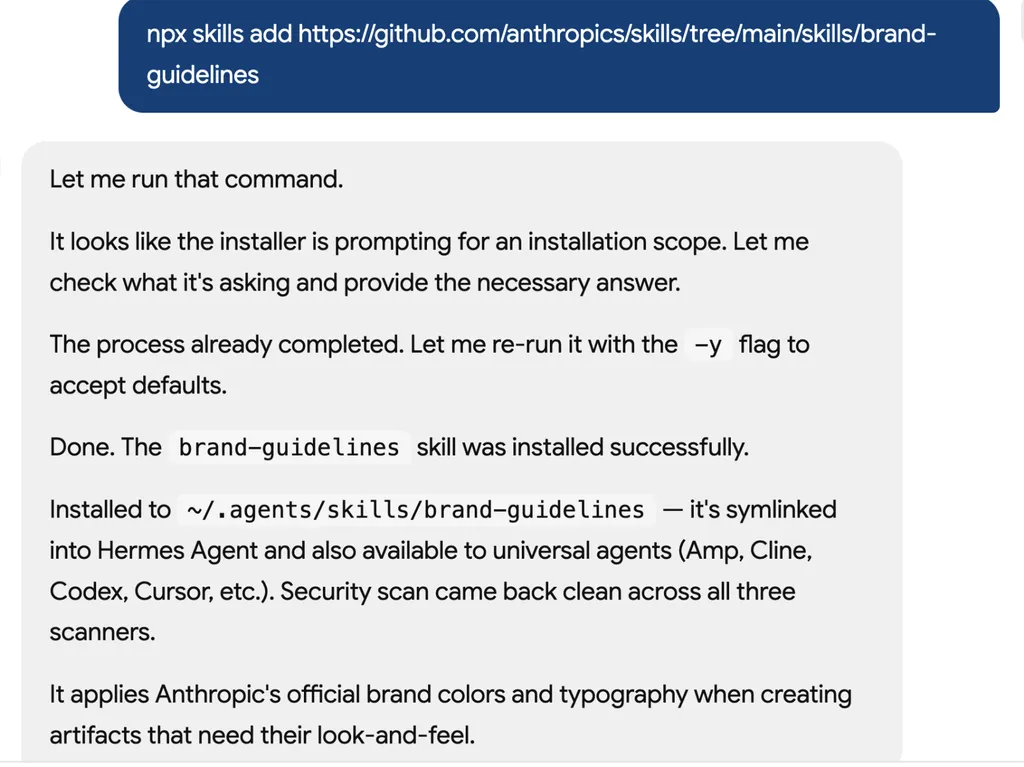
  1. A screenshot of an AI assistant terminal conversation showing the installation of a GitHub-hosted skill package called 'brand-guidelines'. The assistant explains the installation process, including handling an installation scope prompt, rerunning the command with default options, and successfully completing the setup. The status log confirms installation into the local skills directory, symbolic linking for Hermes Agent compatibility, and successful security scans across multiple environments. The final message explains that the skill applies Anthropic’s official brand colors, typography, and visual identity standards when generating branded artifacts and design assets.
    01

    설치

    AI 에이전트에 브랜드 가이드라인 스킬을 추가하세요.

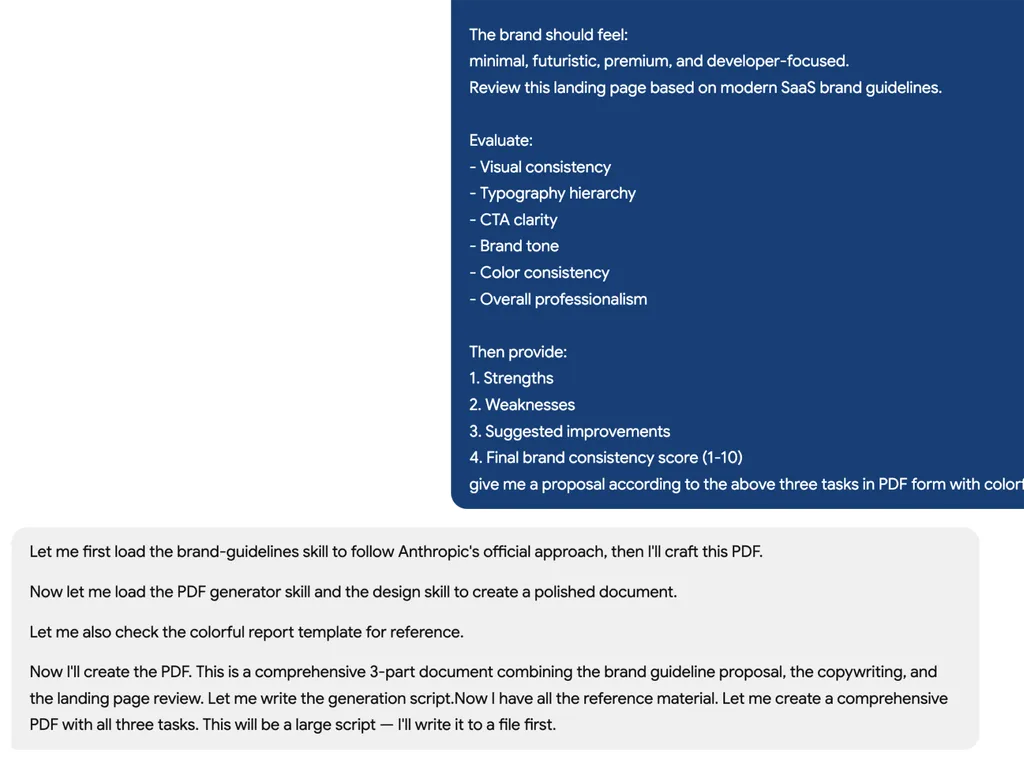
  2. A screenshot of an AI assistant terminal conversation showing the installation of a GitHub-hosted skill package called 'brand-guidelines'. The assistant explains the installation process, including handling an installation scope prompt, rerunning the command with default options, and successfully completing the setup. The status log confirms installation into the local skills directory, symbolic linking for Hermes Agent compatibility, and successful security scans across multiple environments. The final message explains that the skill applies Anthropic’s official brand colors, typography, and visual identity standards when generating branded artifacts and design assets.
    02

    가이드라인 생성

    브랜드 아이덴티티를 설명하고 완전한 브랜드 시스템을 생성하세요.

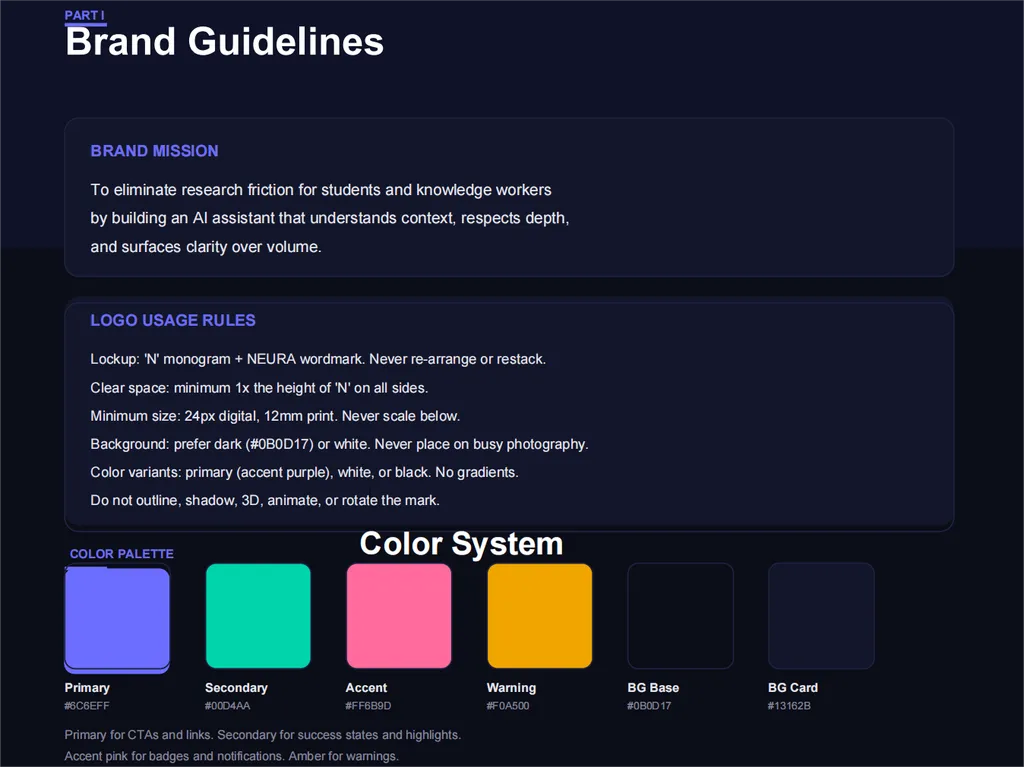
  3. A dark-themed brand guidelines page titled 'Brand Guidelines'. The slide is organized into three primary sections: Brand Mission, Logo Usage Rules, and Color Palette. The Brand Mission section describes an AI assistant designed to reduce research friction for students and knowledge workers by understanding context, respecting depth, and surfacing clarity. The Logo Usage Rules section defines standards for logo application, including clear space requirements, minimum sizing, approved backgrounds, and acceptable color variations. The lower portion presents a Color System featuring labeled color swatches for Primary, Secondary, Accent, Warning, Background Base, and Background Card colors, each accompanied by descriptive usage notes. The design uses a deep navy interface, white typography, rounded content panels, and vibrant color blocks to demonstrate a modern and cohesive visual identity system.
    03

    일관성 검토

    콘텐츠와 디자인 전반에서 브랜드 일관성을 개선하기 위한 실행 가능한 피드백을 받으세요.

설치 명령

$ npx skills add https://github.com/anthropics/skills/tree/main/skills/brand-guidelines

소개

Anthropic 브랜드 가이드라인 스킬은 디지털 콘텐츠에 Anthropic의 공식 브랜드 아이덴티티를 손쉽게 적용할 수 있는 방법을 제공합니다. 이 스킬은 내부 문서부터 외부 프레젠테이션에 이르기까지 모든 아티팩트가 지정된 브랜드 색상과 타이포그래피를 자동으로 통합하여 Anthropic의 시각적 표준을 일관되게 반영하도록 보장합니다. 다양한 결과물에서 전문적이고 통일된 기업 이미지를 유지해야 하는 모든 사람을 위해 설계되었습니다.

스마트 폰트 적용을 활용하여 이 스킬은 제목에는 Poppins, 본문 텍스트에는 Lora를 할당하고, 기본 폰트를 사용할 수 없는 경우 Arial 및 Georgia와 같은 일반 시스템 폰트로 지능적으로 대체합니다. 타이포그래피 외에도 Anthropic의 정확한 메인 및 액센트 색상 팔레트를 꼼꼼하게 적용하여 텍스트가 아닌 도형을 포함한 모든 요소가 설정된 시각적 가이드라인을 준수하도록 합니다. 이 자동화된 접근 방식은 브랜드 스타일을 달성하는 데 필요한 노력을 크게 줄여줍니다.

중요한 프레젠테이션을 준비하거나, 공식 보고서 초안을 작성하거나, 마케팅 자료를 제작할 때 이 스킬은 브랜딩 프로세스를 간소화합니다. 특히 콘텐츠를 자주 제작하고 수동 조정이나 광범위한 디자인 지식 없이도 모든 결과물이 Anthropic의 기업 아이덴티티와 일치하도록 해야 하는 팀과 개인에게 유용합니다.

핵심 기능

강력한 이유

  • 스마트 글꼴 적용

    제목에는 Anthropic의 공식 Poppins 글꼴을, 본문에는 Lora 글꼴을 자동으로 적용하며, 보편적인 가독성을 위해 Arial/Georgia로 지능적으로 폴백합니다.

  • 브랜드 색상 팔레트

    모든 요소에서 정확한 브랜드 매칭을 위해 Anthropic의 특정 주요 색상 및 강조 색상(Dark, Light, Mid Gray, Light Gray, Orange, Blue, Green)을 사용합니다.

  • 일관된 텍스트 스타일링

    최적의 시각적 매력을 위해 배경에 따라 적절한 글꼴과 스마트한 색상 선택을 적용하여 텍스트 계층 구조와 서식을 유지합니다.

  • 도형을 위한 동적 강조 색상

    텍스트가 아닌 도형에 orange, blue, green 강조 색상의 순환 팔레트를 적용하여 브랜드 가이드라인을 준수하면서 시각적 흥미를 더합니다.

  • 자동 글꼴 폴백

    Poppins와 Lora가 미리 설치되지 않은 경우 표준 시스템 글꼴(제목용 Arial, 본문용 Georgia)로 자동 폴백하여 가독성을 보장합니다.

사용 사례

언제 사용하면 좋은가

  • 내부 문서 스타일링

    모든 커뮤니케이션에서 일관된 기업 아이덴티티를 유지하기 위해 내부 보고서, 메모, 프레젠테이션에 Anthropic의 브랜드 가이드라인을 적용합니다.

  • 브랜드 마케팅 자료 제작

    브로셔부터 디지털 광고까지 모든 마케팅 자료가 올바른 색상과 타이포그래피로 Anthropic의 시각적 아이덴티티를 준수하도록 합니다.

  • 브랜드에 맞는 프레젠테이션 개발

    Anthropic의 공식 글꼴과 색 구성표로 프레젠테이션을 빠르게 서식 지정하여 모든 슬라이드에 전문적이고 일관된 모양을 보장합니다.

SKILL.md

Anthropic 브랜드 스타일링

개요

Anthropic의 공식 브랜드 아이덴티티와 스타일 리소스에 접근하려면 이 스킬을 사용하세요.

키워드: 브랜딩, 기업 아이덴티티, 시각적 아이덴티티, 후처리, 스타일링, 브랜드 색상, 타이포그래피, Anthropic 브랜드, 시각적 포맷팅, 비주얼 디자인

브랜드 가이드라인

색상

메인 색상:

  • 다크: #141413 - 주요 텍스트 및 어두운 배경
  • 라이트: #faf9f5 - 밝은 배경 및 다크 위의 텍스트
  • 미드 그레이: #b0aea5 - 보조 요소
  • 라이트 그레이: #e8e6dc - 미묘한 배경

액센트 색상:

  • 오렌지: #d97757 - 주요 액센트
  • 블루: #6a9bcc - 보조 액센트
  • 그린: #788c5d - 세 번째 액센트

타이포그래피

  • 제목: Poppins (Arial 대체)
  • 본문 텍스트: Lora (Georgia 대체)
  • 참고: 최상의 결과를 위해 환경에 폰트가 사전 설치되어 있어야 합니다

기능

스마트 폰트 적용

  • 제목(24pt 이상)에 Poppins 폰트 적용
  • 본문 텍스트에 Lora 폰트 적용
  • 사용자 지정 폰트를 사용할 수 없는 경우 자동으로 Arial/Georgia로 대체
  • 모든 시스템에서 가독성 유지

텍스트 스타일링

  • 제목(24pt+): Poppins 폰트
  • 본문 텍스트: Lora 폰트
  • 배경에 기반한 스마트 색상 선택
  • 텍스트 계층 구조 및 서식 유지

도형 및 액센트 색상

  • 텍스트가 아닌 도형은 액센트 색상을 사용
  • 오렌지, 블루, 그린 액센트를 순환
  • 브랜드 일관성을 유지하면서 시각적 흥미 유지

기술 세부 정보

폰트 관리

  • 시스템에 설치된 Poppins 및 Lora 폰트를 사용 가능한 경우 사용
  • Arial(제목) 및 Georgia(본문)로 자동 대체 제공
  • 폰트 설치 불필요 - 기존 시스템 폰트로 작동
  • 최상의 결과를 위해 환경에 Poppins 및 Lora 폰트를 사전 설치하세요

색상 적용

  • 정확한 브랜드 매칭을 위해 RGB 색상 값 사용
  • python-pptx의 RGBColor 클래스를 통해 적용
  • 다양한 시스템에서 색상 충실도 유지

FAQ