Himalaya 이메일 에이전트 스킬
터미널에서 직접 이메일을 읽고, 검색하고, 보내고, 답장하고, 전달하고, 이동하고, 삭제하고, 관리하기 위해 Himalaya CLI를 사용하세요.
설치
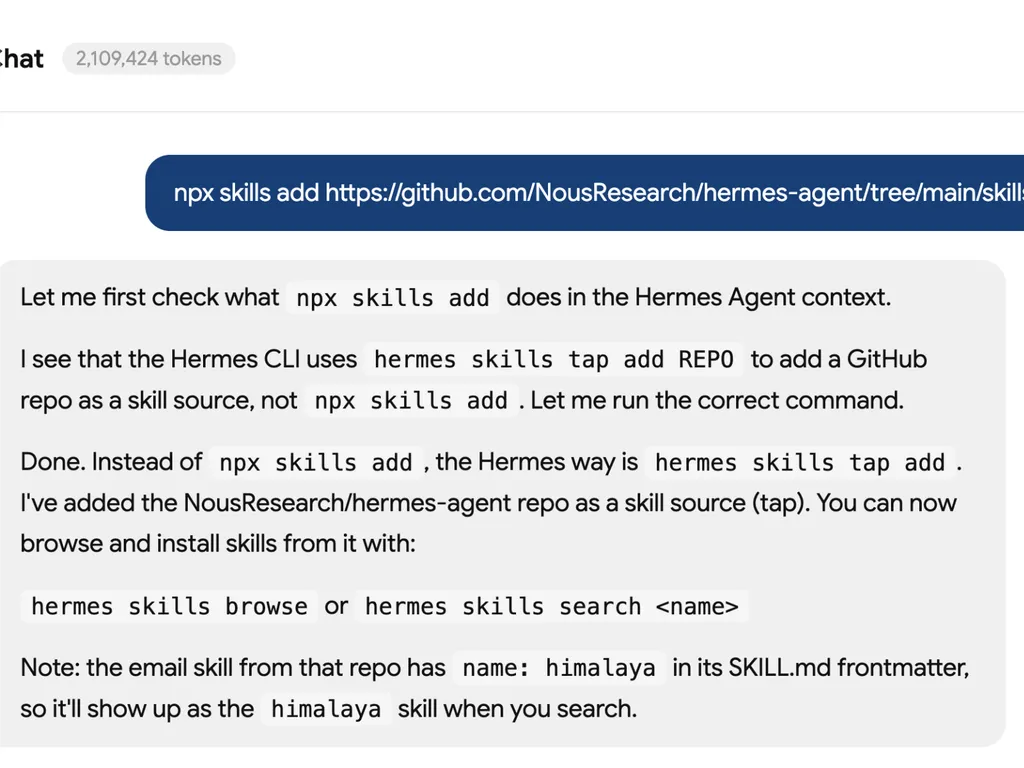
bash npx skills add https://github.com/NousResearch/hermes-agent/tree/main/skills/email
하는 일
Himalaya 이메일 에이전트 스킬은 외부 himalaya CLI를 통해 AI 에이전트에게 터미널 기반 이메일 기능을 제공합니다.
이를 통해 에이전트는 IMAP 및 SMTP를 사용하여 실제 사서함과 작업할 수 있으므로 이메일 분류, 메시지 검색, 사서함 정리, 답장 초안 작성, 메시지 전달 및 첨부 파일 다운로드에 유용합니다.
주요 기능
- 이메일 폴더 나열
- 받은 편지함 또는 사용자 정의 폴더의 이메일 나열
- 발신자, 제목 또는 키워드로 이메일 검색
- 일반 텍스트 이메일 내용 읽기
- 원시 MIME 메시지 내보내기
- 터미널에서 새 이메일 보내기
- 기존 이메일 스레드에 답장하기
- 메시지 전달하기
- 폴더 간 이메일 이동 또는 복사
- 이메일 삭제
- 이메일 플래그 추가 또는 제거
- 여러 이메일 계정 작업
- 첨부 파일 다운로드
- 구조화된 자동화를 위해 JSON 출력 사용
사용 사례
- 이메일 받은 편지함 관리
- 이메일 검색 및 조회
- 자동화된 이메일 분류
- 답장 초안 작성 및 보내기
- 중요한 메시지 전달하기
- 나중에 처리하기 위해 첨부 파일 다운로드
- 터미널 우선 이메일 워크플로우 구축
- 에이전트 워크플로우를 IMAP/SMTP 사서함과 연결
요구 사항
이 스킬을 사용하기 전에 필요합니다:
- Himalaya CLI 설치됨
- Himalaya 구성 파일 위치:
bash ~/.config/himalaya/config.toml
- IMAP 및 SMTP 자격 증명이 안전하게 구성됨
- pass, 시스템 키링 또는 다른 비밀번호 명령과 같은 안전한 방법을 통해 저장된 비밀번호
Himalaya CLI 설치
리눅스 또는 macOS에 권장 설치:
bash curl -sSL https://raw.githubusercontent.com/pimalaya/himalaya/master/install.sh | PREFIX=~/.local sh
macOS Homebrew를 통해:
bash brew install himalaya
Cargo를 통해 설치:
bash cargo install himalaya --locked
기본 설정
대화형 계정 구성 마법사를 실행하세요:
bash himalaya account configure
또는 수동으로 구성 파일을 만드세요:
toml [accounts.personal] email = "you@example.com" display-name = "Your Name" default = true backend.type = "imap" backend.host = "imap.example.com" backend.port = 993 backend.encryption.type = "tls" backend.login = "you@example.com" backend.auth.type = "password" backend.auth.cmd = "pass show email/imap" message.send.backend.type = "smtp" message.send.backend.host = "smtp.example.com" message.send.backend.port = 587 message.send.backend.encryption.type = "start-tls" message.send.backend.login = "you@example.com" message.send.backend.auth.type = "password" message.send.backend.auth.cmd = "pass show email/smtp" folder.aliases.inbox = "INBOX" folder.aliases.sent = "Sent" folder.aliases.drafts = "Drafts" folder.aliases.trash = "Trash"
일반 명령어
폴더 나열
bash himalaya folder list
받은 편지함 이메일 나열
bash himalaya envelope list
특정 폴더의 이메일 나열
bash himalaya envelope list --folder "Sent"
이메일 검색
bash himalaya envelope list from john@example.com subject meeting
이메일 읽기
bash himalaya message read 42
새 이메일 보내기
bash cat << 'EOF' | himalaya template send From: you@example.com To: recipient@example.com Subject: Test Message Hello from Himalaya! EOF
이메일에 답장하기
bash himalaya template reply 42 | sed 's/^$/\nYour reply text here\n/' | himalaya template send
이메일 전달하기
bash himalaya template forward 42 | sed 's/^To:.*/To: newrecipient@example.com/' | himalaya template send
이메일 이동
bash himalaya message move 42 "Archive"
이메일 삭제
bash himalaya message delete 42
첨부 파일 다운로드
bash himalaya attachment download 42
JSON으로 출력
bash himalaya envelope list --output json
참고
이 스킬은 터미널 기반 사서함 작업을 위해 설계되었습니다. 외부 himalaya CLI와 올바르게 구성된 이메일 계정에 의존합니다.
에이전트 워크플로우의 경우, 파이프 입력이 대화형 편집기를 여는 것보다 일반적으로 더 안정적입니다. 에이전트가 결과를 프로그래밍 방식으로 구문 분석해야 할 때는 JSON 출력이 권장됩니다.
최적의 사용 대상
- 터미널 이메일 워크플로우를 선호하는 개발자
- 직접적인 사서함 접근이 필요한 AI 에이전트
- 이메일 자동화 작업
- IMAP/SMTP 기반 이메일 관리
- 가벼운 개인 생산성 워크플로우
출처
GitHub:
text https://github.com/NousResearch/hermes-agent/tree/main/skills/email