NanoSkill
提交你的 Skill

Humanizer-zh 技能

作者op741811KGitHub 星標GitHub

Humanizer-zh 是一款 AI 人性化工具,能改寫中文文字以消除 AI 痕跡,提供自然且像真人寫作的內容。幾秒內即可免費開始使用。

人性化安全掃描通過
結果預覽

完整 Demo

探索由本技能驅動、可用於生產環境的中文 AI 人性化報告。

開始使用

完成第一個任務

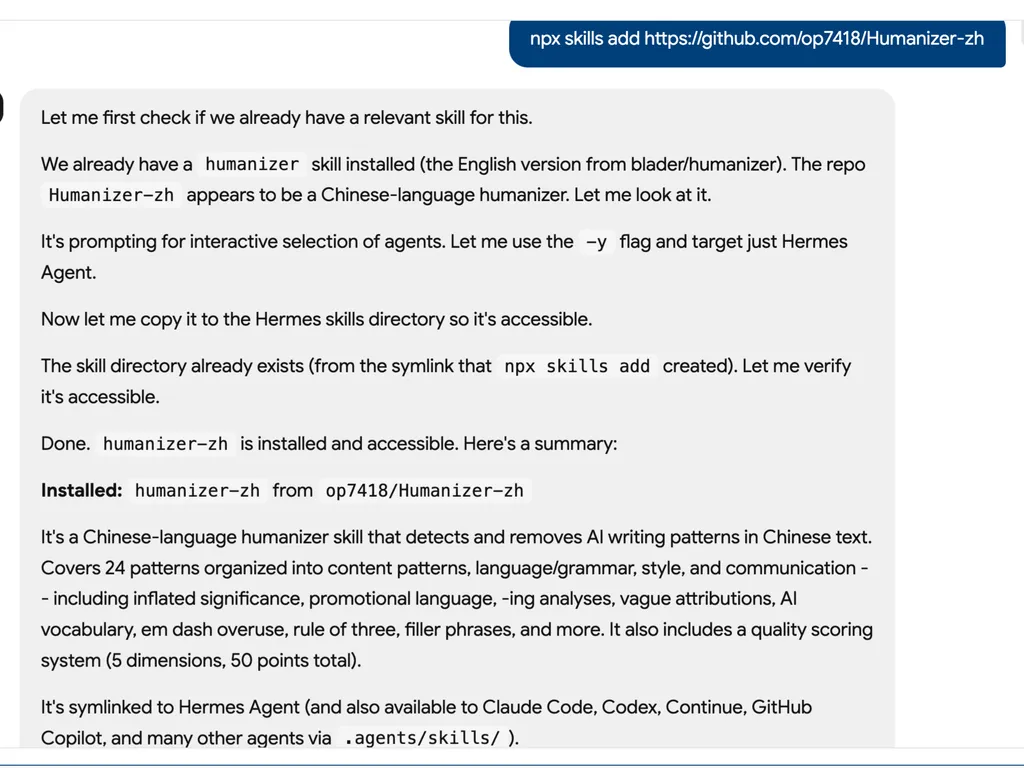
  1. AI agent installation log showing setup of the Humanizer-zh skill from the op7418/Humanizer-zh GitHub repository using an npx skills add command. The interface explains that an existing English humanizer skill is already installed, then identifies Humanizer-zh as a Chinese-language humanizer designed to detect and remove AI writing patterns in Chinese text. The workflow handles interactive agent selection with a -y flag, verifies accessibility, and confirms installation into the Hermes Agent skills directory. The summary notes that the skill covers 24 AI-writing patterns across content structure, grammar, style, and communication, including inflated significance, promotional language, vague attribution, AI vocabulary, em dash overuse, rule-of-three phrasing, and filler expressions, with a five-dimension quality scoring system totaling 50 points.
    01

    安裝

    將中文 AI 人性化技能新增到您的 AI 代理中。

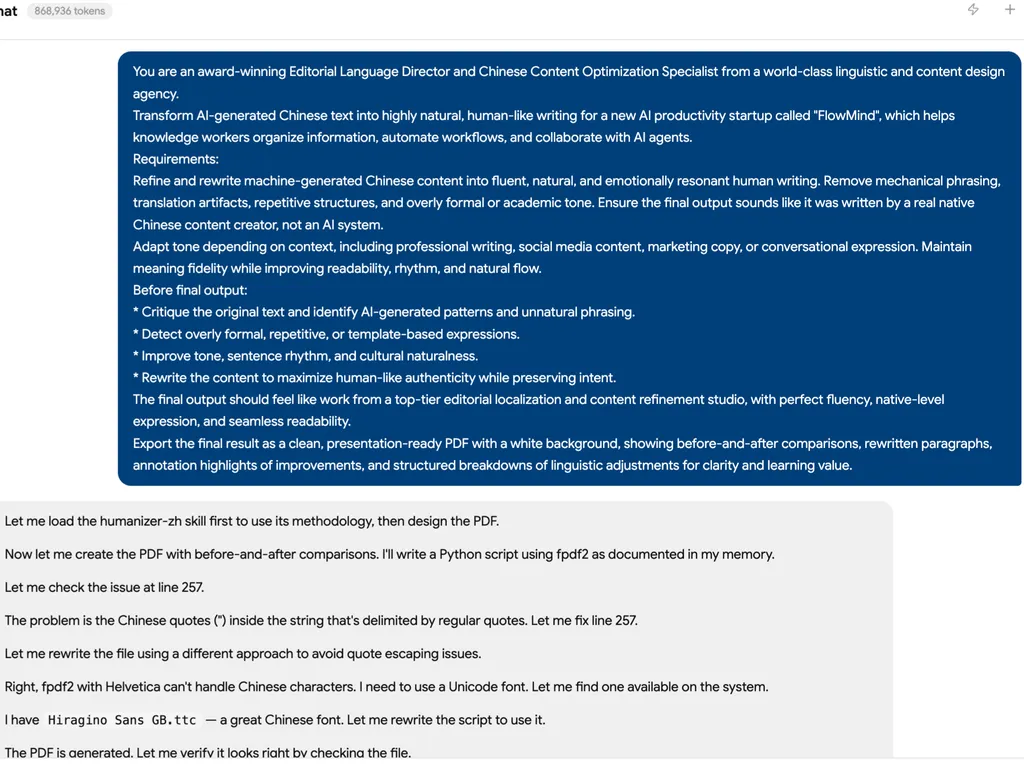
  2. AI agent workflow screen showing a detailed prompt for using a Chinese humanizer skill to transform AI-generated Chinese text into natural, human-like writing for FlowMind, an AI productivity startup. The prompt defines the role as an editorial language director and Chinese content optimization specialist, with requirements to remove mechanical phrasing, translation artifacts, repetitive structures, overly formal tone, and template-like expressions while preserving meaning and improving readability, rhythm, emotional resonance, and cultural naturalness. The workflow log below shows the agent loading the humanizer-zh skill, creating a PDF with before-and-after comparisons, resolving quote escaping issues, switching to a Unicode Chinese font, and verifying the generated PDF output.
    02

    人性化內容

    提供 AI 生成的中文文字,以更自然、更道地的寫作風格進行重寫。

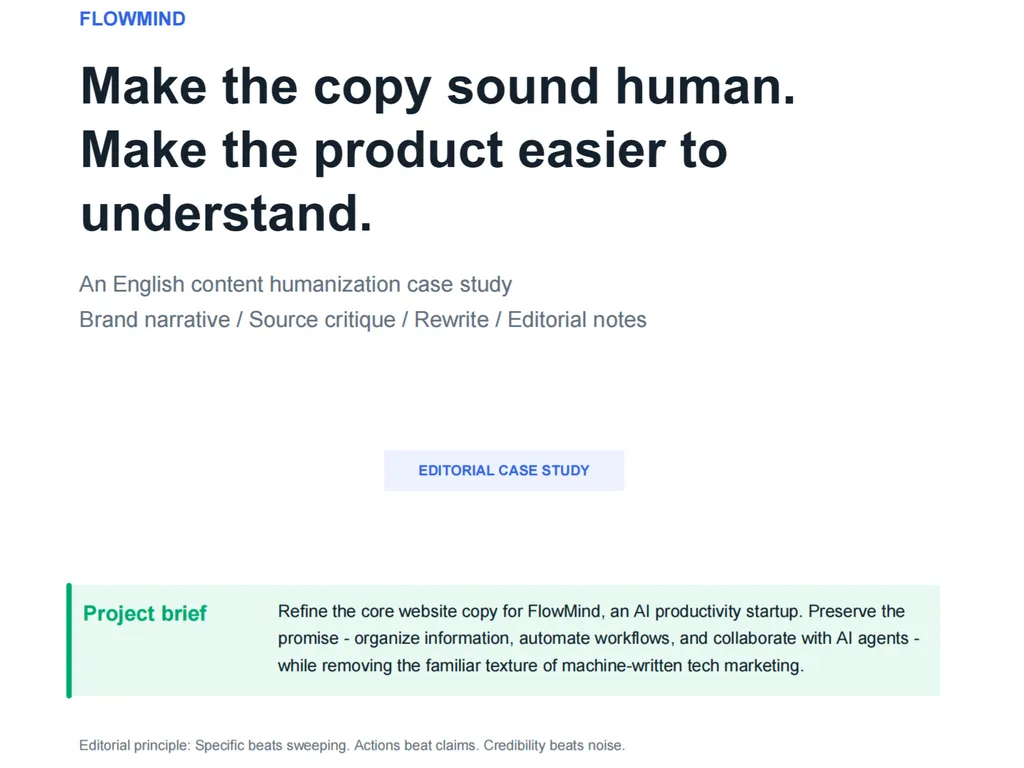
  3. A clean editorial case study cover page for FlowMind focused on copy humanization. The page headline reads 'Make the copy sound human. Make the product easier to understand.' Supporting text describes it as an English content humanization case study covering brand narrative, source critique, rewrite, and editorial notes. A centered label reads 'EDITORIAL CASE STUDY'. A highlighted project brief box explains the goal of refining FlowMind's core website copy while preserving the product promise of organizing information, automating workflows, and collaborating with AI agents, while removing machine-written tech marketing language. The footer includes an editorial principle emphasizing that specificity, action, and credibility matter more than sweeping claims or noise.
    03

    精煉表達

    獲得經過潤飾的內容,提升流暢度、語氣和可讀性,同時保留原意。

安裝指令

$ npx skills add https://github.com/op7418/Humanizer-zh

關於

Humanizer-zh 是一款 AI 人性化工具,幫助編輯、行銷人員和研究人員將 AI 生成的中文文字轉化為真實、人性化的寫作。它去除機械化的模式,如過度使用的流行語和生硬的結構,將僵硬的草稿轉化為能與真實讀者產生共鳴的自然內容。

與基本的改寫工具不同,它識別出 24 種特定的 AI 寫作痕跡,並分為內容、語言、風格和溝通等類別。針對中文慣例進行調整,它會修正從三疊句濫用到標題大小寫等問題,確保輸出內容真正感覺像是手工製作。

無論您是優化行銷文案、潤飾學術摘要還是撰寫部落格,Humanizer-zh 都能直接在 Claude Code 中透過簡單的斜線指令運作。只需一行指令安裝,然後告訴它要人性化哪些文字——這個工具會在保留核心含義的同時重寫,並增添人性的溫暖。

核心功能

它的強大之處

  • 24 種 AI 模式檢測

    AI 人性化工具能識別並修復內容、語言、風格和溝通方面的 24 種特定 AI 寫作痕跡。

  • 中文語言優化

    針對中文文本進行了調整,將標題大寫、三疊結構和術語等模式適應當地寫作慣例。

  • 一鍵安裝

    使用 npx skills add 即時安裝,無需複雜設定或 API 金鑰即可開始人性化文本。

  • 自然重寫指南

    結合模式檢測與以人為本的重寫原則,確保輸出內容生動、具有觀點,而不僅僅是「乾淨」。

  • AI 詞彙警告

    標記過度使用的 AI 流行語,例如「此外」、「展示」和「掛毯」,幫助您避免機械化的措辭。

使用場景

什麼時候適合使用

  • 人性化行銷文案

    將 AI 生成的宣傳文本轉化為真實、引人入勝的文案,與真正的讀者產生共鳴。

  • 優化學術寫作

    從研究摘要和摘要中移除 AI 痕跡,同時保留科學精確性。

  • 潤色部落格文章

    將僵硬的 AI 草稿轉化為對話式、有觀點的文章,讓讀者喜愛。

SKILL.md

Humanizer-zh:AI 寫作痕跡移除工具(中文版)

免責聲明:

  • 本專案的核心文件翻譯自 blader/humanizer
  • 實用工具部分(核心規則、快速檢查清單、品質評分)參考 hardikpandya/stop-slop
  • 原始專案基於維基百科的 AI 寫作跡象 指南

專案簡介

Humanizer-zh 是一個用於去除文字中 AI 生成痕跡的工具,幫助你重寫 AI 生成的內容,使其聽起來更自然、更像人類書寫。

本專案適用於:

  • 編輯和審閱 AI 生成的內容
  • 提升文章的人性化品質
  • 學習識別常見的 AI 寫作模式

安裝

方法一:透過 npx 一鍵安裝(推薦)

npx skills add https://github.com/op7418/Humanizer-zh.git

這是最簡單的安裝方式,會自動將技能安裝到正確的目錄。

方法二:透過 Git 複製

# Clone to Claude Code's skills directory
git clone https://github.com/op7418/Humanizer-zh.git ~/.claude/skills/humanizer-zh

方法三:手動安裝

  1. 下載本專案的 ZIP 檔案或複製到本地
  2. Humanizer-zh 資料夾複製到 Claude Code 的技能目錄:
    • macOS/Linux~/.claude/skills/
    • Windows%USERPROFILE%\\\\.claude\\\\skills\\\\
  3. 確保資料夾結構如下:
    ~/.claude/skills/humanizer-zh/
    ├── SKILL.md       # Skill definition file (Chinese version)
    └── README.md      # Documentation
    

驗證安裝

重新啟動 Claude Code 或重新載入技能後,在對話中輸入:

/humanizer-zh

如果安裝成功,技能將被啟用。

使用方法

基本用法

在 Claude Code 中,你可以透過以下方式使用 Humanizer:

1. 直接調用技能
/humanizer-zh Please humanize the following text:

[Paste your AI-generated text]
2. 在對話中使用
Please use humanizer to rewrite this passage to make it more natural:

This project serves as proof of our team's commitment to innovation. Additionally, it showcases our key role in the ever-evolving technological landscape.
3. 處理檔案內容
/humanizer-zh Please humanize the content in article.md

使用情境範例

情境一:改寫行銷文案

輸入:

/humanizer-zh
Located in the picturesque center of Hangzhou, this café boasts rich cultural heritage and breathtaking decor. It serves as the focal point of the city's coffee culture, offering customers a seamless, intuitive, and vibrant experience.

輸出範例:

這家咖啡館在杭州市中心已經開了三年,以手沖咖啡和翻新的老建築空間聞名。

情境二:改寫學術摘要

輸入:

/humanizer-zh
This study delves into the critical role of machine learning in medical diagnosis, highlighting its importance in the ever-evolving healthcare landscape. Additionally, it lays a solid foundation for the future development of this field.

輸出範例:

本研究分析了機器學習在醫療診斷中的應用,專注於早期肺癌篩檢,使用了 2019 至 2023 年間的 5,000 份病歷。

情境三:改寫部落格文章

輸入:

/humanizer-zh
Artificial intelligence is not just a technology; it is a revolution in the way we think about the future. Industry experts believe it will have a lasting impact on society as a whole.

輸出範例:

我一直在想 AI 會如何改變我們的工作方式。上週和幾個做產品開發的朋友聊天,有些人很興奮,有些人擔心失業——真相大概藏在某個無聊的中間地帶。

可偵測的 AI 寫作模式

本工具可以識別並修正 24 種 AI 寫作痕跡,分為四大類別:

📝 內容模式(6 種)

  1. 過度強調重要性、傳承與更廣泛的趨勢
  2. 過度強調受歡迎程度與媒體報導
  3. 以 -ing 結尾的表面分析
  4. 宣傳與廣告用語
  5. 模糊歸因與曖昧措辭
  6. 樣板式的「挑戰與未來展望」段落

🔤 語言與文法模式(6 種)

  1. 濫用的「AI 詞彙」
  2. 避免使用「to be」(系詞迴避)
  3. 否定平行結構
  4. 三的法則的過度使用
  5. 刻意替換同義詞(同義詞輪換)
  6. 虛假範圍

🎨 風格模式(6 種)

  1. 破折號的過度使用
  2. 粗體的過度使用
  3. 行內標題垂直清單
  4. 標題中的標題大小寫
  5. 表情符號
  6. 彎引號

💬 溝通模式與填充詞(6 種)

  1. 協作溝通痕跡
  2. 知識截止免責聲明
  3. 討好/奉承語氣
  4. 填充短語
  5. 過度修飾
  6. 通用正向結論

檔案說明

  • SKILL.md - 中文版技能定義檔案
  • README.md - 本文件

注意: 英文原版請見 blader/humanizer

手動使用方法

基本工作流程

  1. 識別 AI 模式 - 比對 SKILL.md 中列出的 24 種模式掃描文字
  2. 重寫有問題的段落 - 以自然表達取代 AI 痕跡
  3. 保留核心含義 - 確保資訊完整性
  4. 保持適當語氣 - 符合文字預期的風格
  5. 注入真實個性 - 賦予文字「人性化觸感」

關鍵原則

✨ 不只「乾淨」,更要「生動」

避免 AI 模式只是基礎;好的寫作需要真實的人類聲音:

  • 擁有主見 - 不只報導事實;要對它們做出反應
  • 變化節奏 - 混合長短句
  • 承認複雜性 - 真實的人會有複雜的感受
  • 適當使用「我」 - 第一人稱是誠實的標誌
  • 允許一些混亂 - 完美的結構可能感覺機械化
  • 具體描述感受 - 以具體細節取代抽象摘要
範例比較

重寫前(AI 風格):

新的軟體更新證明了該公司對創新的承諾。此外,它提供無縫、直覺且強大的使用者體驗——確保使用者能有效率地達成目標。這不僅是一次更新,更是我們對生產力思維的一場革命。

重寫後(人性化):

軟體更新增加了批次處理、鍵盤快捷鍵和離線模式。測試使用者的早期回饋正面——多數人表示任務完成速度更快。

變動:

  • 移除了誇大的象徵(「證明了」)
  • 移除了 AI 詞彙(「此外」、「無縫」)
  • 移除了三的法則(「無縫、直覺且強大」)
  • 移除了否定平行結構(「不僅...更是...」)
  • 增加了具體功能和真實回饋

常見 AI 詞彙警示清單

以下詞彙在 AI 生成的文字中異常頻繁出現:

  • 此外、至關重要、深入探討、強調
  • 持久、增強、促進、收益
  • 突顯、交互作用、複雜/複雜性
  • 景觀(抽象名詞)、關鍵、展示
  • 織錦(抽象名詞)、證明、強調
  • 有價值、充滿活力

貢獻

如果你發現翻譯問題或想改進文件,請提交 Issue 或 Pull Request。

中文語境特色

在翻譯與改編過程中,我們考慮了中文寫作的特性:

  • 某些英文模式在中文中有不同呈現(例如標題大小寫問題)
  • 新增了適合中文語境的範例
  • 調整了部分用語以符合中文習慣

參考資料

  • 維基百科:AI 寫作跡象 - 原始指南來源
  • WikiProject AI Cleanup - 維基百科 AI 清理專案
  • blader/humanizer - 原始英文專案
  • hardikpandya/stop-slop - 實用部分的靈感來源

授權

本翻譯專案遵循原始專案的授權條款。核心內容基於維基百科社群的觀察與總結。


提示: 本工具並非設計來「欺騙」AI 檢測器,而是真正提升寫作品質。「去 AI 化」文字的最佳方式,是賦予它真實的人類思想與聲音。

常見問題