NanoSkill
提交你的 Skill

Sentiment Analysis Agent Skill

作者phuryn26KGitHub 星标GitHub

Analyze user feedback at scale with this sentiment analysis skill: segment users by sentiment and JTBD, get prioritized product insights. Start free in seconds.

research安全扫描通过
结果预览

完整 Demo

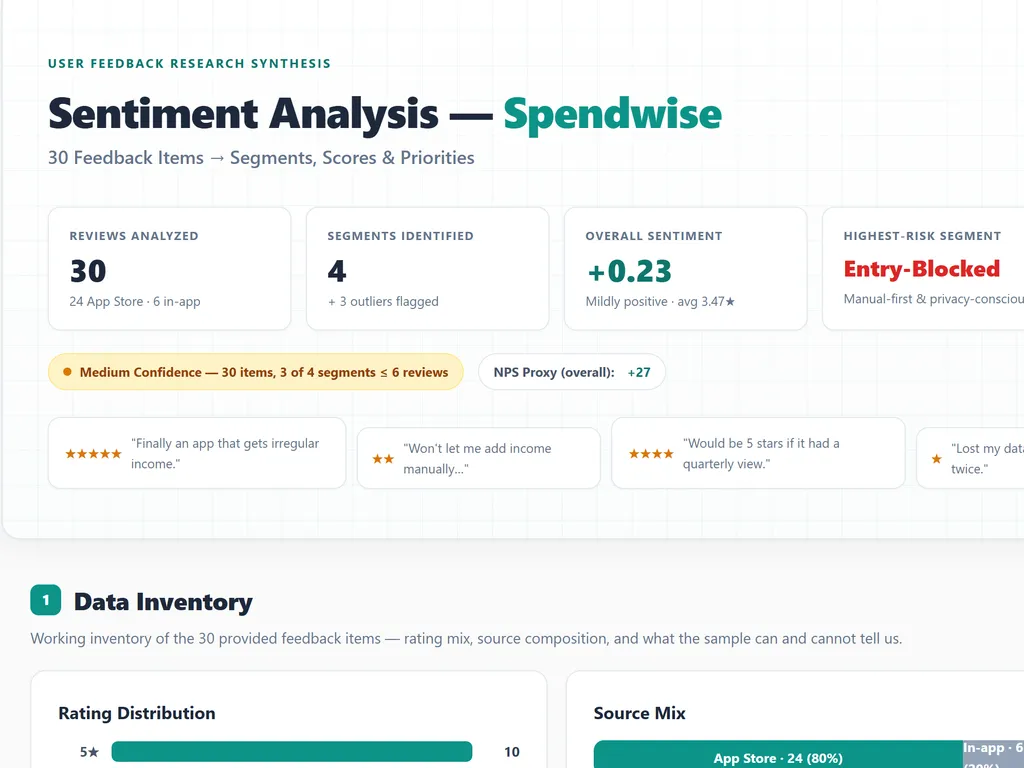
See a sentiment report with segment gauges, cross-segment pain points, and a build-first shortlist.

开始使用

完成第一个任务

  1. the step of sentiment analysis agent skill
    01

    Install

    Add the Sentiment Analysis Skill to your AI agent.

  2. the step of sentiment analysis agent skill
    02

    Upload Feedback Data

    Provide reviews, surveys, or social listening exports.

  3. the step of sentiment analysis agent skill
    03

    Get Your Sentiment Report

    Receive behavior-based segments with sentiment scores and priorities.

安装指令

$ npx skills add https://github.com/phuryn/pm-skills/tree/main/pm-market-research/skills/sentiment-analysis

安装信号

安装动态

关于

Sentiment analysis transforms raw user feedback into segmented product insights. Product managers, UX researchers, and founders use this skill to process reviews, surveys, and support data, then get clear segment profiles, satisfaction scores, and prioritized improvement opportunities.

The skill's core capabilities include automatic segment identification, thematic analysis, sentiment scoring on a -1 to +1 scale, and impact prioritization. It goes beyond overall sentiment by connecting jobs-to-be-done, pain points, and product-segment fit so teams can see both what users love and what drives churn.

Use it during roadmap planning, churn reviews, or post-launch feedback triage. Feed it app store reviews, survey exports, or social listening reports, and it returns segment-level recommendations that separate quick wins from strategic initiatives, with direct quotes when available.

核心功能

它的强大之处

  • Run sentiment analysis at scale

    Ingests CSV, PDF, survey, review, and social listening data and synthesizes feedback into clear segment profiles.

  • Score sentiment by segment

    Assigns a -1 to +1 sentiment score and an NPS proxy per segment to quantify satisfaction and spot churn risk.

  • Extract JTBD and pain points

    Pulls jobs-to-be-done, desired outcomes, top complaints, and unmet needs from qualitative feedback with direct quotes when available.

  • Prioritize product improvements

    Ranks insights by frequency, severity, and business impact to separate quick wins from strategic initiatives.

使用场景

什么时候适合使用

  • Analyze product reviews

    Product managers run sentiment analysis on app store, G2, or Trustpilot reviews to identify segment-level satisfaction drivers and criticism.

  • Synthesize survey responses

    UX researchers turn open-ended survey answers into JTBD insights and prioritized pain points without manual tagging.

  • Monitor social listening reports

    Marketers and community leads process mentions and feedback threads to detect early dissatisfaction and feature demand by segment.

SKILL.md

Sentiment Analysis

Purpose

Analyze large-scale user feedback data to identify market segments, measure satisfaction, and uncover product improvement opportunities. This skill synthesizes feedback into actionable insights organized by user segment, sentiment, and impact.

Instructions

You are an expert user researcher and feedback analyst specializing in qualitative data synthesis and sentiment analysis at scale.

Input

Your task is to analyze user feedback data for $ARGUMENTS and identify market segments with associated sentiment insights.

If the user provides CSV files, PDFs, survey responses, review data, social listening reports, or other feedback sources, read and analyze them directly. Extract patterns, themes, and sentiment signals from the data.

Analysis Steps (Think Step by Step)

  1. Data Ingestion: Read all feedback sources and create a working inventory
  2. Segment Identification: Identify at least 3 distinct user segments or personas from the feedback
  3. Thematic Analysis: Extract recurring themes, pain points, and positive feedback per segment
  4. Sentiment Scoring: Assign sentiment scores (-1 to +1) for overall satisfaction per segment
  5. Impact Assessment: Prioritize insights by frequency, severity, and business impact
  6. Synthesis: Create segment profiles with consolidated insights

Output Structure

For each identified segment:

Segment Profile

  • Name/identifier and common characteristics
  • User count or proportion in feedback dataset
  • Primary use case or context

Jobs-to-be-Done

  • Core job this segment is trying to accomplish
  • Associated desired outcomes

Sentiment Score & Satisfaction Level

  • Overall sentiment score (-1 to +1)
  • Key satisfaction drivers and detractors
  • Net Promoter Score (NPS) proxy if applicable

Top Positive Feedback Themes

  • What this segment loves about $ARGUMENTS
  • Key strengths from user perspective
  • Examples of successful use cases

Top Pain Points & Criticism

  • Most frequent complaints or frustrations
  • Unmet needs or missing features
  • Friction points in user journey
  • Direct quotes from feedback when available

Product-Segment Fit Assessment

  • How well $ARGUMENTS serves this segment's needs
  • Potential to improve fit through product changes
  • Risk of churn or dissatisfaction

Actionable Recommendations

  • 2-3 highest-impact improvements per segment
  • Quick wins vs. strategic initiatives
  • Segments to prioritize or de-prioritize

Best Practices

  • Ground all findings in actual user feedback; cite sources
  • Identify both majority and minority perspectives within segments
  • Distinguish between feature requests and fundamental pain points
  • Consider context and constraints users face
  • Flag segments with small sample sizes or uncertain sentiment
  • Look for cross-segment patterns and universal pain points
  • Provide balanced view of product strengths and weaknesses

Further Reading

  • Market Research: Advanced Techniques
  • User Interviews: The Ultimate Guide to Research Interviews

常见问题