Cold Outreach
When to Use
Activate when a founder needs to write cold emails or LinkedIn messages to prospects, potential customers, investors, or strategic contacts. Also use when the user says "nobody replies to my emails," "how do I reach out to X," "write me a cold email," or "help with outbound."
Context Required
From startup-context or the user:
- Target prospect — Name, role, company, and why them specifically
- Research signals — Recent news (funding, launches, hires), LinkedIn activity, company growth data, or role/industry context
- Sender positioning — Who you are, what you offer, your unique credibility
- Platform — Email, LinkedIn, or both
- Batch size — Single prospect or multi-prospect campaign
Work with whatever the user provides. A strong research signal and clear value prop is enough to draft. Note what would strengthen the message but do not block on missing inputs.
Workflow
- Gather context — Read startup-context if available. Ask for missing info on prospect, value prop, and proof points.
- Research the prospect — Conduct web searches for recent signals. The core principle: 10 minutes of research transforms a cold message into a warm one. Rank signals by strength:
- Tier 1 (strongest): Recent news — funding rounds, product launches, key hires
- Tier 2: LinkedIn activity — posts, comments, job changes
- Tier 3: Company growth signals — hiring trends, tech stack changes
- Tier 4 (weakest): Role/industry awareness only
- Assign personalization tier — Based on research signals found:
- Tier 1 (custom): Named signals across multiple research sources — fully personalized message
- Tier 2 (templated + personalized): Company info and role context — template with personalized elements
- Tier 3 (volume template): No signals found — use volume approach with strong value prop
- Select mode based on scope:
- Quick: Single connection request + follow-up for one prospect
- Standard: Four-touch sequence for a prospect (default)
- Deep: Multi-prospect system with A/B variant messages
- Draft the sequence — Write messages following the structure and rules below.
- Self-critique pass — Before delivering, validate that personalization connects to the problem. If you remove the personalized opening and the message still makes sense, the personalization is not working. Rewrite.
Output Format
Deliver all of the following:
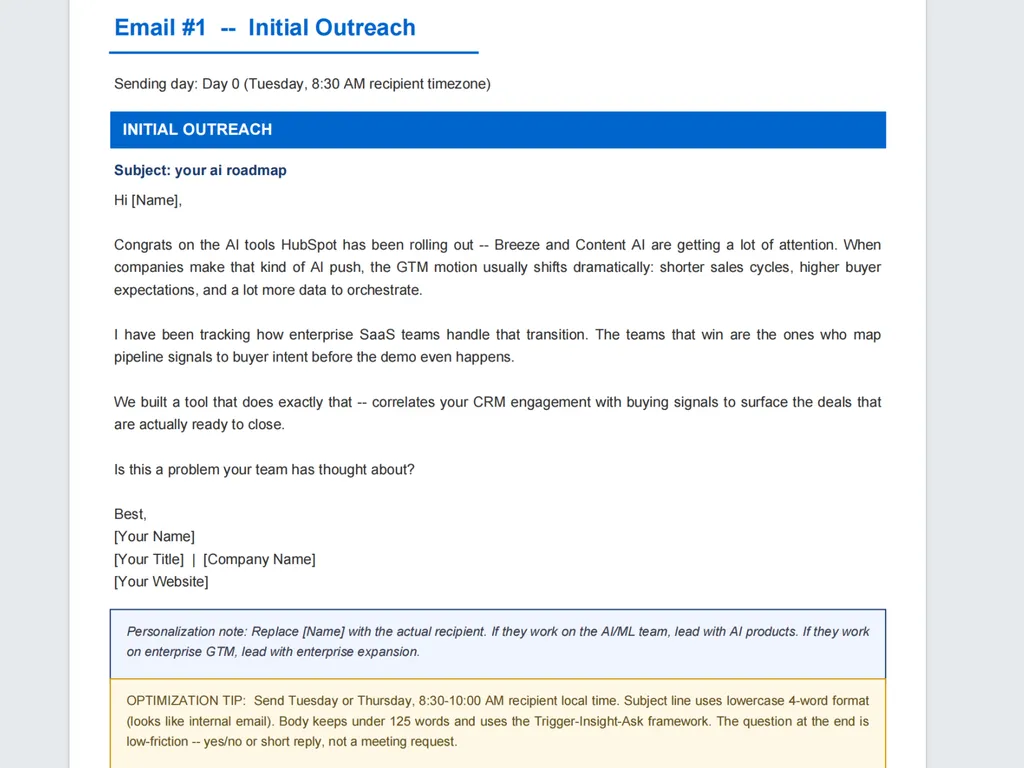
- Connection request (LinkedIn, max 300 characters) or Subject line (email, 2-4 words, lowercase)
- Primary message — the full outreach text (emails under 125 words, InMails under 500 characters)
- Follow-up sequence — with timing and a new angle per touch
- Personalization notes — what to customize per recipient if sending to multiple prospects
- Tier label — which personalization tier this message uses and why
Frameworks & Best Practices
The Core Principle
The word "cold" is the problem. Every message should feel like it comes from someone who understands the prospect's world. Research is what makes that possible.
Message Structure
- Connection request (LinkedIn): Max 300 characters. Reference something specific. Never pitch in the request.
- First message (24-48 hours after connection): "Thanks for connecting" + bridge to a research signal + value statement + question. Keep it conversational.
- Follow-up 1 (Day 7): Introduce a new angle — different problem, proof point, or insight.
- Follow-up 2 (Day 14): Share something valuable (article, data, framework) with a soft reconnect.
- Break-up (Day 21): Professional close — "Closing the loop. If timing is ever right, I'm here."
Writing Principles
- Write like a peer, not a vendor. Use contractions. If it sounds like marketing copy, rewrite it.
- Every sentence must earn its place. If it does not move toward a reply, cut it.
- Lead with their world, not yours. "You/your" should dominate over "I/we."
- One ask, low friction. Interest-based CTAs ("Worth exploring?") beat meeting requests.
- Every message must reference a specific research signal or explicitly default to Tier 3. This is a hard rule.
Email Frameworks
- Observation-Problem-Proof-Ask — You noticed X, which usually means Y challenge. We helped Z with that. Interested?
- Trigger-Insight-Ask — Congrats on X. That usually creates Y challenge. We have helped similar companies. Curious?
- Story-Bridge-Ask — [Similar company] had [problem]. They [solved it this way]. Relevant to you?
Subject Lines
- 2-4 words, lowercase, no punctuation tricks
- Should look like an internal email ("quick question," "re: [their company]")
- No product pitches, no urgency, no emojis
What to Avoid
- Opening with "I hope this finds you well" or "My name is X and I work at Y"
- Jargon: "synergy," "leverage," "best-in-class," "leading provider"
- Feature dumps — one proof point beats ten features
- HTML formatting, images, or multiple links in cold emails
- Fake "Re:" or "Fwd:" subject lines
- Asking for 30-minute calls in first touch
- Sending identical templates with only the name swapped
- Pitching in a LinkedIn connection request
Founder-Specific Advantages
- Founder-to-founder or founder-to-exec emails get 2-3x higher reply rates
- Lead with "I built this because..." — more compelling than "our company offers..."
- Offer what reps cannot: personal onboarding, product roadmap input, advisory relationships
Related Skills
lead-scoring— use to prioritize which prospects to reach out to firstsales-script— use when the outreach lands a meeting and you need a discovery call or demo script
Examples
Example prompt: "I need to reach out to VP Engineering at mid-market SaaS companies about our API monitoring tool. We reduced downtime by 73% for Acme Corp."
Good email output (Standard mode, Tier 2):
Subject: api alerts
Hi [Name],
Saw your team just shipped the new payments integration — nice work. Launches like that usually surface a wave of edge-case API failures that are tough to catch with standard monitoring.
We built a tool that catches those failures before customers notice. Acme Corp cut their API downtime by 73% in the first month.
Worth a quick look?
Good LinkedIn connection request:
Hi [Name] — saw the payments launch. We help engineering teams catch API failures before customers do. Would love to connect.
Follow-up (Day 7, new angle):
Hi [Name], quick thought — after launches like yours, the #1 issue teams tell us about isn't downtime, it's the silent failures that slip through alerts. Happy to share what patterns we see across 50+ engineering teams if useful.